





In retail organisations, user manuals often sit in an unusual place. In our experience, it is common that manuals are handled by packaging or brand teams and treated much like marketing materials. Those teams are already fluent in design tools, especially Adobe Illustrator, and naturally choose Adobe InDesign for user manual layout work. The result is a desktop workflow that feels accessible and produces visually strong output for user manuals.
The challenge appears later, when manuals must behave less like a one-off marketing artefact and more like a repeatable operational deliverable: multiple languages, multiple revision rounds, tighter schedules, and reliable traceability. This is especially true when documentation includes regulatory content — where accuracy, consistency, and a clear record of changes matter as much as layout quality.
This article explains why the bottleneck happens, what typically breaks first (especially in localisation and revision cycles), and how shifting from InDesign Desktop to Pergamon with InDesign Server changes the operating model — without giving up the user manual design quality that made InDesign attractive for user manual designs in the first place.
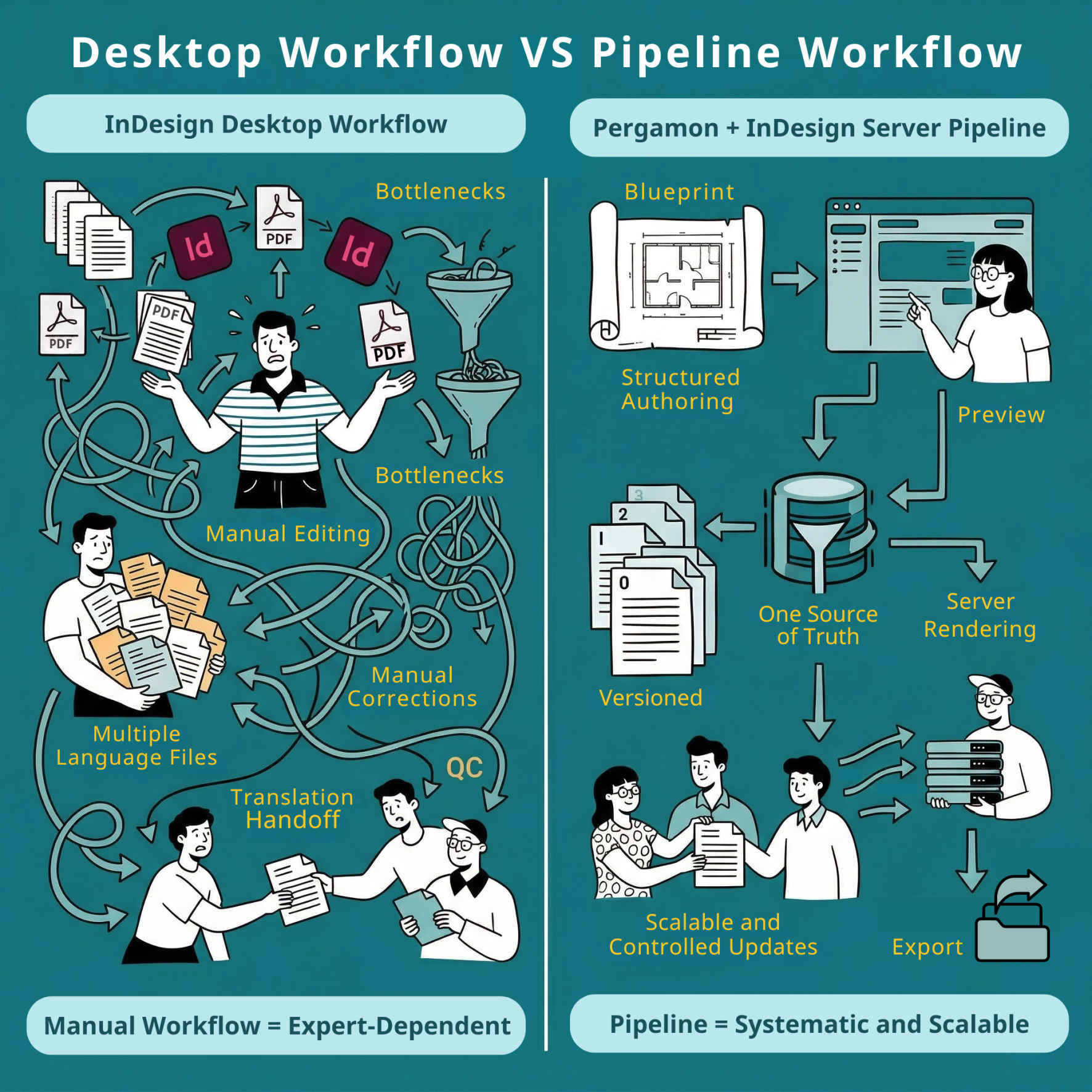
Why InDesign Desktop becomes a bottleneck at scale to user manual designs
InDesign is a page layout tool. It was not designed as an end-to-end technical documentation system with built-in version control, structured content governance, and localisation workflows. In a small team with highly skilled operators, that is often fine. At scale, the friction becomes operational.
1) The proficiency gap becomes a production risk
The learning curve in InDesign is steep for writers who are primarily trained to create content, not to operate a layout engine. What starts as small “layout shortcuts” becomes a reliability issue:
- Local formatting is applied instead of styles, causing inconsistency and harder updates.
- Hard returns are used to move text around, introducing fragile layout behaviour.
- Assets are not inserted correctly into stories, creating unexpected reflow issues.
These are not “user errors” so much as a sign that the tool expects a level of layout discipline that is hard to maintain across a broader team — especially when timelines are tight.
2) User Manual Translation revisions become the cost centre
The first translation pass is often workable using translation handoff files. The real pain begins after the first draft, when changes are requested.
In a typical desktop flow, revisions come back as change instructions (often in Excel). Applying those changes becomes manual copy/paste work in the source and then again across targets. On top of that, changes often must be documented in PDFs so QC teams can track what changed in each target language.
This is where revision rounds quietly multiply operational cost. In our experience, even relatively short manuals can become “heavy” when they go through several revision rounds across multiple languages.
3) Regulatory content increases the pressure on traceability
When documentation contains regulatory content, teams need to be able to answer basic but critical questions quickly:
- What changed, and where?
- Which languages are affected?
- Which version was delivered to which customer or market?
- Are all language editions aligned after the latest revisions?
In a desktop file workflow, answering those questions often depends on human discipline: careful file naming, careful logging, and careful coordination across writers, typesetters, and QC. That works — until it doesn’t.
4) Traceability and reuse do not scale naturally
Desktop workflows are fragile at the operational level:
- Files get duplicated and renamed.
- Versions can diverge or get lost.
- Reuse is limited beyond flat Creative Cloud Libraries.
For a Product or Operations manager, unpredictability is the real problem: deadlines slip not because teams are slow, but because the workflow is not designed for controlled iteration.
The legacy model: InDesign Desktop + service workflow (Impala Services)
A common version of the desktop service model looks like this (we see it frequently when working with InDesign Desktop teams, including workflows supported by Impala Services):
- Starting point: previous similar manual or a template from a CC Library
- Writers draft based on product sample and manufacturer inputs; illustrations are requested from an illustrator; sometimes the draft starts in English and German
- Internal QC loops
- Source approval
- Translation preparation: preparing translation handoff files based on the approved source; ensuring non-translatable localisation components will be inserted using conditional text or custom scripts
- Translation via a TMS
- Multiple target-language files are sent to a typesetting team
- Typesetting
- QC
- Draft sent to customer (sometimes with multiple language blocks and different versions depending on print vs online delivery)
- Corrections loop (source changes require updating translations; ensuring changes propagate is manual and is typically the biggest pain point)
- Approval and release
This workflow can deliver high-quality output. The issue is that it scales by adding more expert effort, not by increasing process stability. The moment you increase revision rounds or language count, the correction loop becomes the dominant cost driver.
What changes when you move to Pergamon with InDesign Server
The shift we advocate is not “replace InDesign.” It is to keep InDesign as the user manual layout engine, but move from a desktop file workflow to a controlled pipeline.
In Pergamon, we target three fragile areas of the desktop model: how documents are created, how localisation readiness is enforced, and how revisions propagate.
1) Blueprint-driven assembly replaces “start from a similar manual”
Instead of beginning a project by searching for the closest prior manual or a template in a CC Library, we assemble documents from structured blueprints created by a knowledge engineering team.
In practical terms, this means:
- Structure is consistent from the start.
- Reuse becomes systematic rather than ad-hoc.
- The document is built for operations (updates, variants, languages), not just for layout.
2) Localisation readiness is enforced by design, not training
In desktop workflows, teams rely on training and discipline: apply styles, avoid layout shortcuts, and prepare the source correctly for localisation.
In Pergamon, we embed rules that make the source safer for localisation:
- Content that should not be deleted is embedded and locked.
- The system is designed to keep the source consistent for downstream processes.
This has a direct operational consequence: new writers onboard faster because rules are embedded. The process becomes less dependent on a few highly trained operators and more resilient as teams grow.
3) Revision loops stop being manual copy/paste projects
This is where operational impact is usually the biggest.
When the source changes:
- Targets are marked in the correct places where translation updates are needed.
- Deleted or moved content is reflected across targets.
- The workflow reduces the “did we update every language everywhere?” burden.
You still review and validate content — but you are no longer rebuilding change propagation manually across multiple target files.
4) Version control moves inside the document object
Instead of managing versions by duplicating InDesign files and maintaining a manual project log, Pergamon keeps the document as a single object with versions inside it and a difference summary.
For regulated content, this is not just “nice to have.” It helps teams maintain clear traceability: what changed, when it changed, and which editions are aligned with the latest source.
5) AI translation is an option — selectively applied for high ROI
We do not position AI translation for user manuals as a one-size-fits-all replacement for a TMS. In our experience, it is most valuable when applied selectively: certain clients, languages, and content types.
When it is appropriate, the speed and cost benefits are substantial. The key is governance: using AI translation where it fits the quality and regulatory expectations of the project, and using other workflows when it does not.
6) AI writing support becomes in-context and structured
Many teams already use chatbots, but the workflow is often “copy/paste out, copy/paste back.” That breaks context and increases the risk of inconsistent style.
In Pergamon, the writing assistant is aware of the document structure and relevant project materials and can inject content in the correct style when prompted. This reduces friction and helps writers move faster without sacrificing consistency.
How it works (diagram-level explanation)
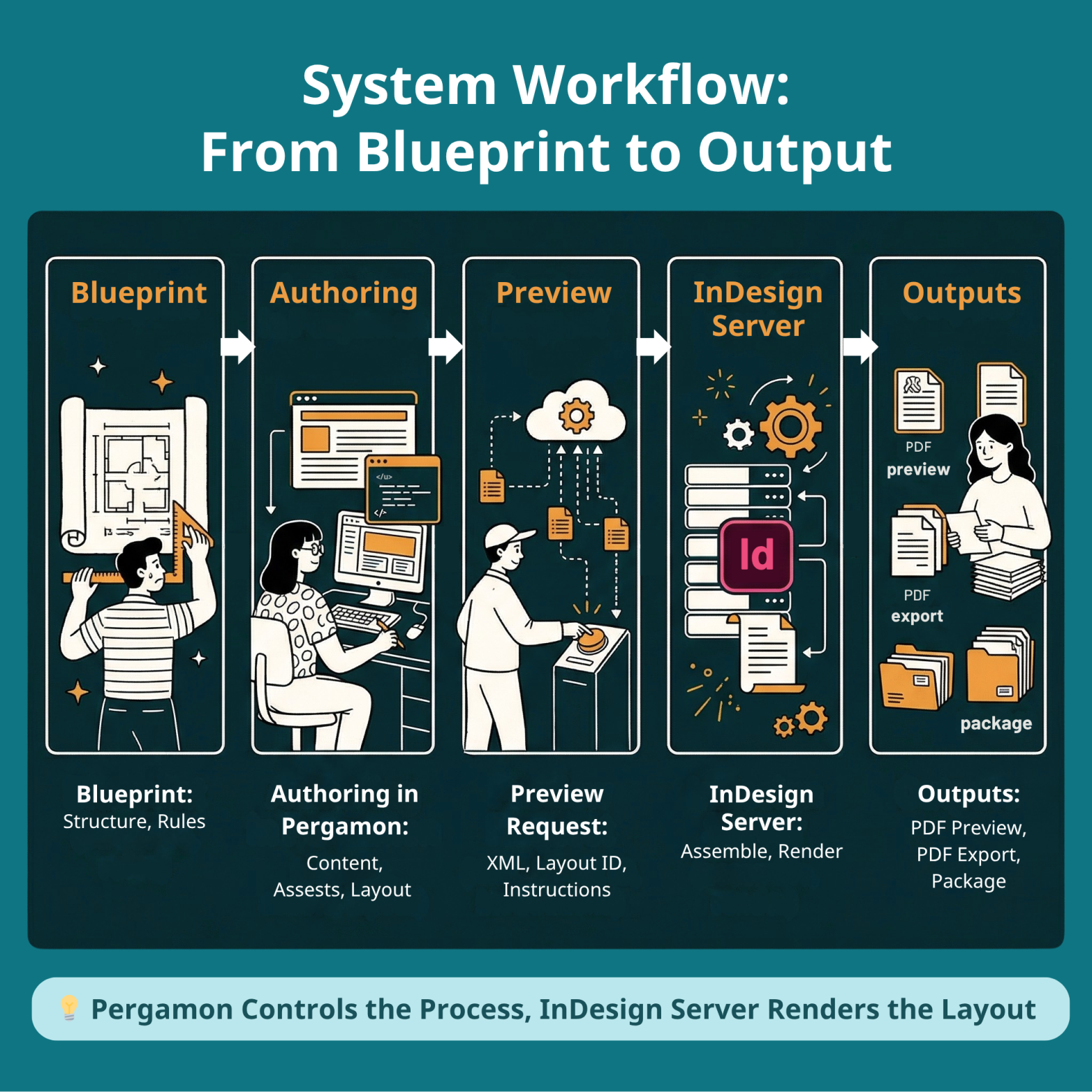
Here is the simplest accurate description of the pipeline:
- Templates and processing rules for each client or brand are predefined by a layout engineer and stored for server rendering together with stylesheets and special character mappings.
- An author creates a document from a blueprint and selects a layout.
- During authoring, when the user presses Preview, Pergamon sends structured content (XML), job instructions, the layout ID, asset links, and content processing rules. InDesign Server opens the layout, inserts the content, runs assembly rules, and exports a PDF preview close to WYSIWYG.
- Users can combine documents into publications that include different templates (Front/Body/Back) and languages, similar to an InDesign Book.
- The system exports PDFs and InDesign Packages.
- The system can receive Illustrator files; InDesign Server generates PNG previews from .ai so assets can render in the browser.
What this means operationally (for a Product/Operations manager)
In our current projects, a typical manual might be 8–16 pages per language, in 4–8 languages, with 3–8 revision rounds. In that reality, the most important performance metric is not “can we create the first draft?” It is “how expensive is each revision round across all languages?”
A server-based pipeline changes the operating model:
- It reduces dependence on a small group of InDesign experts.
- It makes change propagation systematic rather than manual.
- It improves traceability by keeping versions inside the document object.
- It reduces repetitive QC load, so review effort shifts toward content correctness and exceptions — which matters more when documentation includes regulatory content.
Risk and migration reality
A common concern is lock-in: “If we move away from desktop, can we still handle edge cases?”
Our approach keeps an escape hatch:
- There is no hard lock-in because InDesign Packages are supported.
- Edge cases can still be handled manually in InDesign when necessary.
A typical pilot looks like this:
- Select a product and a blueprint.
- Answer configuration questions to customise output.
- Create a document and upload product references.
- Write with AI support where useful and manually where needed.
- Use Preview frequently for instant layout generation through InDesign Server.
When InDesign Desktop is still the right tool
We still rely on InDesign Desktop for user manuals where it shines:
- Creating layouts
- Debugging
- Handling layout edge cases
The difference is that desktop becomes a specialist tool, not the backbone of the production workflow.
Closing: a practical way to decide
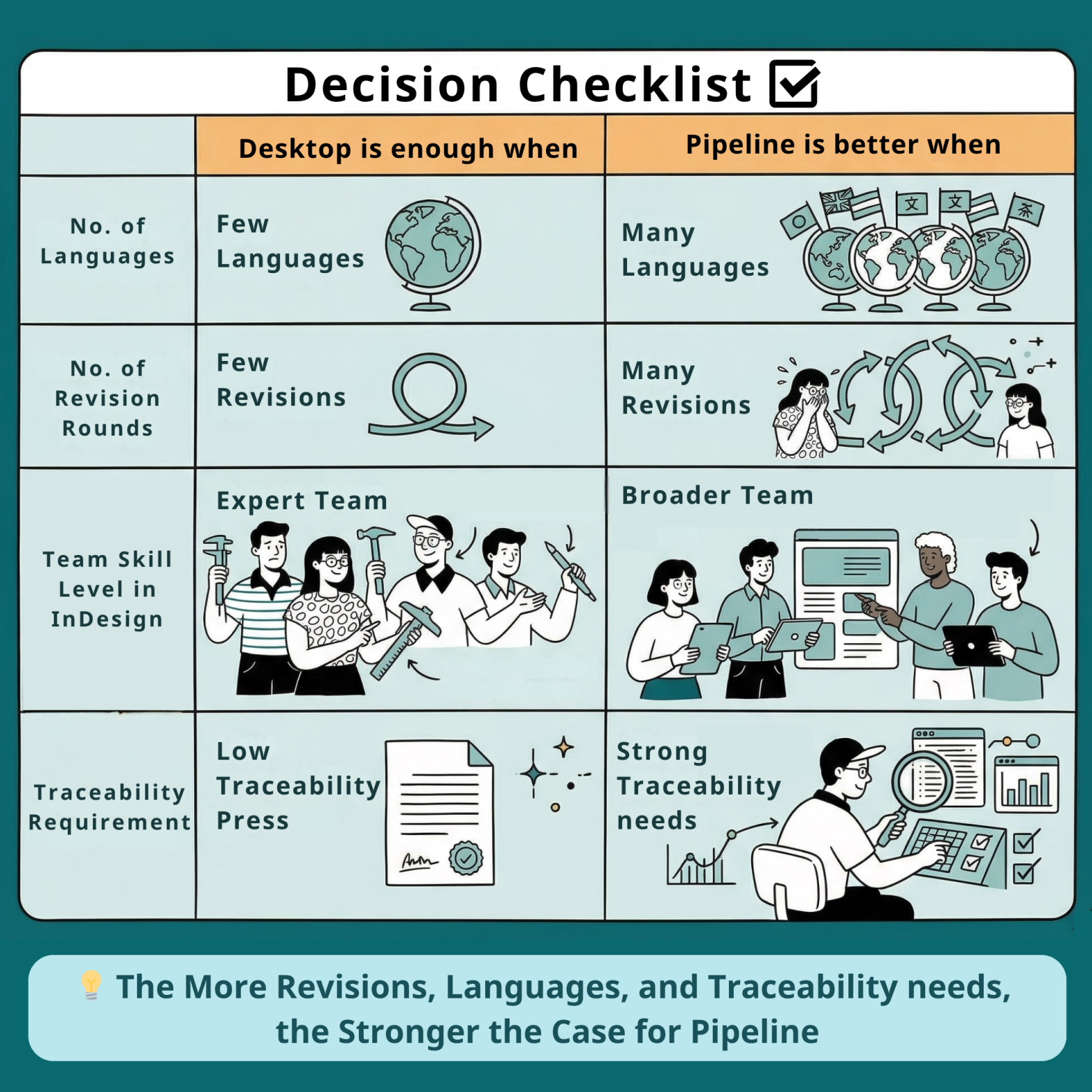
If your manuals are mostly single-language, low revision, and produced by a small group of InDesign experts, a desktop workflow can be sufficient.
If you have multiple languages, multiple revision rounds, and growing team involvement, the operational costs will concentrate around coordination, traceability, and localisation updates. That is where a controlled pipeline — using InDesign Server for rendering and Pergamon for structured assembly and governance — becomes a strategic advantage for both user manual’s design and production.